> ## Documentation Index
> Fetch the complete documentation index at: https://mixpanel-edb78807-mherrman-port-hierarchical-groups.mintlify.site/llms.txt
> Use this file to discover all available pages before exploring further.
# Hierarchical Groups
> A two-level Company → User data model for B2B products, using Mixpanel's reserved company and user ID properties
**Looking for Standard Group Analytics?** If you need flexible, independent group keys without an enforced hierarchy, see [Standard Group Analytics](/docs/data-structure/group-analytics/standard-group-analytics) instead.
Hierarchical Groups is a purpose-built data model for B2B products where **users belong to companies**. Mixpanel enforces a two-level hierarchy — Company (top level) and User (bottom level) — using the reserved properties `$company_id` and `$user_id`. This structure gives you native account-level analytics: count unique companies, measure per-account activation, and understand which accounts are healthy based on the behavior of their users.
## Overview
Hierarchical Groups uses a two-level structure:
* **Company level** (top): Identified by `$company_id`. Represents an account, organization, workspace, or any top-level entity.
* **User level** (bottom): Identified by `$user_id`. Represents an individual user within a company.
The relationship is **many-to-one**: each user belongs to exactly one company, but a company can have many users.
### Composite Identity
In a Hierarchical Groups project, Mixpanel constructs the `distinct_id` from the composite key:
```
distinct_id = $company:|$user:
```
This has a critical implication: **`$user_id` is not globally unique.** A user with `$user_id: alice` in `$company_id: acme` is a completely different user from `$user_id: alice` in `$company_id: globe_inc`. They will have separate profiles and their events will be counted independently.
Additionally, `$company_id` and `$user_id` must be set at the same time. Setting either property determines the canonical `distinct_id` for a user based on the composite properties available. If `$company_id` or `$user_id` are missing, Mixpanel will generate a canonical user\_id that does not include the missing property. For example, a user with `$user_id: alice` without a `$company_id` cannot be later attributed to the same user that is `$user_id: alice` in `$company_id: acme`.
### How Analysis Works
When you analyze by **Company**, Mixpanel implicitly filters to events where `$company_id` is set and counts uniques by `$company_id`. When you analyze by **User**, it counts uniques by the composite `distinct_id`. Additional group keys you define (beyond `$company_id` and `$user_id`) also implicitly filter by `$company_id`. The additional group keys are defined by the composite of `$company_id` and `` (team, org, etc.). The hierarchy will only ever extend one level: company → user or company → other group.
## Advantages
* No more limits on group profiles per group key
* Group membership can apply retroactively for non-default groups (groups other than `$company_id` and `$user_id`)
## Limits
* 1M events per day per group identifier (e.g. `$company_id` = "Mixpanel") - see [Hot Shard Limits](/docs/tracking-best-practices/hot-shard-limits)
* Group properties have similar [limits as User properties](/docs/data-structure/user-profiles#what-are-the-limits-of-user-properties)
## Prerequisites
Before enabling Hierarchical Groups, make sure you meet these requirements:
**You must have a stable `$company_id` and `$user_id` value.** You cannot use identity management to merge different composites of a `$company_id` and `$user_id` together. If you don't yet know what value to use for these properties, we do not recommend enabling Hierarchical Groups. It is possible to merge anonymous events (only `$device_id`, no `$company_id` and `$user_id` properties set) to a `$company_id` and `$user_id` composite with Simplified ID Merge (see [Identity Management](#identity-management) below).
**You must use Simplified ID Merge.** Hierarchical Groups is not supported on projects using Original ID Merge.
**This is a project-creation-time decision.** You cannot convert an existing standard project to Hierarchical Groups, and you cannot remove Hierarchical Groups from a project once enabled. Choose your model before sending any data. Existing projects would need to have their data migrated to a *new* Hierarchical project to work on this system.
## Data Model
### Events
For an event to be attributed properly, the event must include the `$company_id`, `$user_id`, and other group keys with values once they are known. Without these properties on the event, Mixpanel will not attribute that event to a company/user/group properly.
```json theme={"system"}
{
"event": "Purchase",
"properties": {
"time": 1690000000,
"$company_id": "acme",
"$user_id": "alice",
"team_id": "engineering",
"amount": 99.99
}
}
```
In this example, `team_id` is the other group key. If `team_id` is registered as an additional group key, this event will be attributed to company `$company:acme`, user `$company:acme|$user:alice`, and team `$company:acme|$team_id:engineering`.
### Group Profiles
Group profiles are key-value stores of metadata about a specific group. They are identified by the combination of `$company_id`, `group_key`, and `group_id`.
```json theme={"system"}
{
"$company_id": "acme",
"$group_key": "$company_id",
"$group_id": "acme",
"$set": {
"$name": "Acme Corporation",
"plan": "enterprise",
"industry": "Technology",
"employee_count": 500
}
}
```
This example sets properties on the `$company:acme` company group profile.
## Identity Management
Identity Management works only on the user level. In Hierarchical Groups, the canonical user identity is determined by the composite of the `$company_id` and `$user_id` values as soon as one of those values is set (so ideally they are set together at the same time). Events sent without `$company_id` and `$user_id` that have a `$device_id` value can later be merged to a canonical user identifier by having `$company_id` and `$user_id` set alongside the `$device_id` value on an event.
Merging the `$device_id` to the canonical `$company_id` and `$user_id` composite means that all events going forward and historically attributed to the `$device_id` would be merged to the composite identifier, similar to how Simplified ID Merge works outside of Hierarchical Groups. At present the merged events are only visible in the User level activity feed.
## Implementation
Hierarchical Groups can only be implemented via Data Warehouse Connectors or directly via the HTTP APIs. The groups methods in Mixpanel's SDKs only support standard groups.
### Group Keys in Project Settings
Group keys are project-specific. To administer group keys, navigate to your Project Settings. Click **+Add Group Key** under the *Group Keys* section.
1. **Navigate to your Project Settings** (requires project owner or admin permissions)
2. **Click +Add Group Key** under the *Group Keys* section
3. **Fill in the details** on the group key (the exact name as data will be ingested) and the display name that will appear in Mixpanel
Once you hit save, a new row will appear in the Group Keys section with a new group ID (an ID autogenerated on our end, required for queries).
### Tracking Events for a Group
#### Import API
When sending events via the Import API, include `$company_id` and `$user_id` as event properties. The `distinct_id` property should also be present, but Mixpanel will override it with the composite identity.
```bash theme={"system"}
curl --request POST \
--url 'https://api.mixpanel.com/import?strict=1&project_id=YOUR_PROJECT_ID' \
--header 'Content-Type: application/json' \
--header 'accept: application/json' \
--header 'authorization: Basic AUTH_HERE' \
--data '[
{
"event": "Feature Used",
"properties": {
"time": 1690000000,
"$insert_id": "unique_event_id",
"$company_id": "acme",
"$user_id": "alice",
"feature_name": "dashboard"
}
}
]'
```
After ingestion, this event will have:
* `$company_id`: `acme`
* `$user_id`: `alice`
* `distinct_id`: `$company:acme|$user:alice`
#### Warehouse Connector: Events
When creating a Warehouse Connector for events:
1. **Create a new Warehouse Connector** as you normally would, but stop at the **Map Columns** step.
2. **Map the column containing your top-level identifier** to **Company ID**.
3. **Map the column containing your user-level identifier** to **User ID**. This mapping is **required** for Hierarchical Groups projects (it is optional in standard projects).
4. **Set additional group properties on the event.** They do not require any special mapping in the setup process.
5. **Complete the sync.**
After the sync runs, verify that your events carry all three properties: `$company_id`, `$user_id`, and the auto-generated `distinct_id` in the format `$company:|$user:`.
### Updating Group Profiles
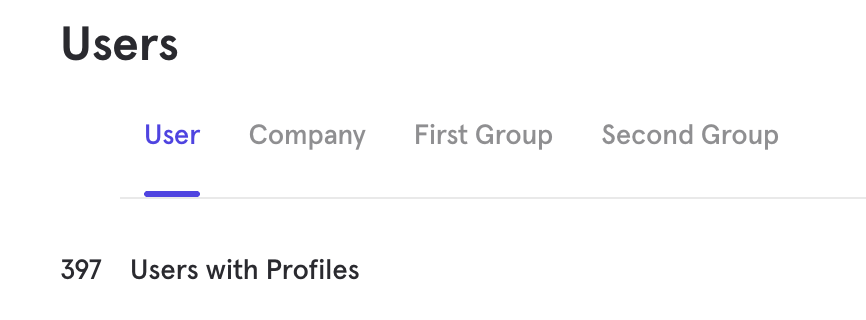
Profiles store metadata about an entity (company, user, and any other groups you have set up). They appear in the **Users** tab of the UI. At the top of the page you will see the groups that you've set up.
 #### Groups HTTP API
To create or update company profiles via the HTTP API, use the `/groups` endpoint. There are three key values that must be set in order to properly set profiles for Hierarchical Groups (outside of `$set`) — `$group_key`, `$group_id`, and `$company_id`.
* `$group_key` — the name of the group key you want to set the profile properties to (`$company_id`, `$user_id`, etc.)
* `$group_id` — the actual value of the group key you want to set those properties on (`acme`, `user_123`, etc.)
* `$company_id` — the value of the parent `$company_id` associated with this child entity (`acme`)
Company Profile Example:
```bash theme={"system"}
curl --request POST \
--url 'https://api.mixpanel.com/groups?strict=1' \
--header 'Content-Type: application/json' \
--data '[
{
"$token": "YOUR_PROJECT_TOKEN",
"$group_key": "$company_id",
"$group_id": "acme",
"$company_id": "acme",
"$set": {
"$name": "Acme Corporation",
"plan": "enterprise",
"industry": "Technology",
"arr": 120000
}
}
]'
```
User Profile Example:
```bash theme={"system"}
curl --request POST \
--url 'https://api.mixpanel.com/groups?strict=1' \
--header 'Content-Type: application/json' \
--data '[
{
"$token": "YOUR_PROJECT_TOKEN",
"$group_key": "$user_id",
"$group_id": "alice",
"$company_id": "acme",
"$set": {
"$name": "Alice Smith",
"role": "admin",
"signup_date": "2024-01-15"
}
}
]'
```
Additional Group Key Example:
```bash theme={"system"}
curl --request POST \
--url 'https://api.mixpanel.com/groups?strict=1' \
--header 'Content-Type: application/json' \
--data '[
{
"$token": "YOUR_PROJECT_TOKEN",
"$group_key": "team_id",
"$group_id": "engineering",
"$company_id": "acme",
"$set": {
"$name": "Engineering Team",
"headcount": 25
}
}
]'
```
The values of `$group_key`, `$group_id`, and `$company_id` should be the bare ID (e.g., `acme`), not the prefixed form (`$company:acme`).
#### Warehouse Connector: Profiles
1. **Create a new Warehouse Connector** and select **Group Table** as the source type.
2. **At the Map Columns step:**
* Set **Group Key** to the group you want this sync to send profile data for (`$company_id`, `$user_id`, etc.)
* Set **Group ID** to the column containing your group identifier values.
* Set **Company ID** to the column containing the identifier values for `$company_id` — this ensures the profile is correctly associated within the hierarchy.
3. **Map any additional columns** to profile properties.
4. **Create the sync.**
After import, profiles will have a Distinct ID in the format `$company:` if doing a `$company_id` sync, `$company:|$user:` for a user sync, or `$company:|:` for other groups you've set up.
## FAQ
#### Can I start with a standard project and switch to Hierarchical Groups later?
No. Hierarchical Groups must be enabled at project creation. If you later decide you need it, you would create a new project with Hierarchical Groups enabled and re-import your data with correct `$company_id` values on every historical event.
#### What happens if I send events without `$company_id`?
The event will still be ingested, but the `distinct_id` will not include the company prefix. The event will not appear in Company-level analysis. If you later send events for the same `$user_id` with a `$company_id`, Mixpanel will treat them as different users, resulting in split profiles.
#### Is the same `$user_id` in two different companies treated as two different users?
Yes. User identity is the composite key (`$company_id`, `$user_id`). An event with `$company_id: acme` and `$user_id: alice` is a completely different user from `$company_id: globe_inc` and `$user_id: alice`. They will have separate profiles and separate event histories.
#### Why do my user profiles not appear after a Warehouse Connector sync?
The most common causes are:
1. You used a "User Table" source type instead of "Group Table." User profiles in Hierarchical Groups must use the Group Table type.
2. The `$user_id` and `$company_id` values in the profile sync don't match the values on your events, so they're creating profiles that don't correspond to any event data.
#### Does Hierarchical Groups work with Original ID Merge?
No. Hierarchical Groups requires Simplified ID Merge. If your project uses Original ID Merge, it is not compatible.
#### Groups HTTP API
To create or update company profiles via the HTTP API, use the `/groups` endpoint. There are three key values that must be set in order to properly set profiles for Hierarchical Groups (outside of `$set`) — `$group_key`, `$group_id`, and `$company_id`.
* `$group_key` — the name of the group key you want to set the profile properties to (`$company_id`, `$user_id`, etc.)
* `$group_id` — the actual value of the group key you want to set those properties on (`acme`, `user_123`, etc.)
* `$company_id` — the value of the parent `$company_id` associated with this child entity (`acme`)
Company Profile Example:
```bash theme={"system"}
curl --request POST \
--url 'https://api.mixpanel.com/groups?strict=1' \
--header 'Content-Type: application/json' \
--data '[
{
"$token": "YOUR_PROJECT_TOKEN",
"$group_key": "$company_id",
"$group_id": "acme",
"$company_id": "acme",
"$set": {
"$name": "Acme Corporation",
"plan": "enterprise",
"industry": "Technology",
"arr": 120000
}
}
]'
```
User Profile Example:
```bash theme={"system"}
curl --request POST \
--url 'https://api.mixpanel.com/groups?strict=1' \
--header 'Content-Type: application/json' \
--data '[
{
"$token": "YOUR_PROJECT_TOKEN",
"$group_key": "$user_id",
"$group_id": "alice",
"$company_id": "acme",
"$set": {
"$name": "Alice Smith",
"role": "admin",
"signup_date": "2024-01-15"
}
}
]'
```
Additional Group Key Example:
```bash theme={"system"}
curl --request POST \
--url 'https://api.mixpanel.com/groups?strict=1' \
--header 'Content-Type: application/json' \
--data '[
{
"$token": "YOUR_PROJECT_TOKEN",
"$group_key": "team_id",
"$group_id": "engineering",
"$company_id": "acme",
"$set": {
"$name": "Engineering Team",
"headcount": 25
}
}
]'
```
The values of `$group_key`, `$group_id`, and `$company_id` should be the bare ID (e.g., `acme`), not the prefixed form (`$company:acme`).
#### Warehouse Connector: Profiles
1. **Create a new Warehouse Connector** and select **Group Table** as the source type.
2. **At the Map Columns step:**
* Set **Group Key** to the group you want this sync to send profile data for (`$company_id`, `$user_id`, etc.)
* Set **Group ID** to the column containing your group identifier values.
* Set **Company ID** to the column containing the identifier values for `$company_id` — this ensures the profile is correctly associated within the hierarchy.
3. **Map any additional columns** to profile properties.
4. **Create the sync.**
After import, profiles will have a Distinct ID in the format `$company:` if doing a `$company_id` sync, `$company:|$user:` for a user sync, or `$company:|:` for other groups you've set up.
## FAQ
#### Can I start with a standard project and switch to Hierarchical Groups later?
No. Hierarchical Groups must be enabled at project creation. If you later decide you need it, you would create a new project with Hierarchical Groups enabled and re-import your data with correct `$company_id` values on every historical event.
#### What happens if I send events without `$company_id`?
The event will still be ingested, but the `distinct_id` will not include the company prefix. The event will not appear in Company-level analysis. If you later send events for the same `$user_id` with a `$company_id`, Mixpanel will treat them as different users, resulting in split profiles.
#### Is the same `$user_id` in two different companies treated as two different users?
Yes. User identity is the composite key (`$company_id`, `$user_id`). An event with `$company_id: acme` and `$user_id: alice` is a completely different user from `$company_id: globe_inc` and `$user_id: alice`. They will have separate profiles and separate event histories.
#### Why do my user profiles not appear after a Warehouse Connector sync?
The most common causes are:
1. You used a "User Table" source type instead of "Group Table." User profiles in Hierarchical Groups must use the Group Table type.
2. The `$user_id` and `$company_id` values in the profile sync don't match the values on your events, so they're creating profiles that don't correspond to any event data.
#### Does Hierarchical Groups work with Original ID Merge?
No. Hierarchical Groups requires Simplified ID Merge. If your project uses Original ID Merge, it is not compatible.